
Empower Yourself: Understanding and Customizing Your App Privacy Settings
In the digital age, applications offer a vast array of conveniences and functionalities. From social networking to productivity tools, apps have become integral to daily life. However, this integration comes with a crucial prerequisite: understanding and managing the privacy settings associated with these applications. This article aims to provide a clear and direct explanation of app privacy, empowering users to make informed decisions about their personal information.
Contents
- 0.1 The Significance of App Privacy Settings
- 0.2 Understanding Your App Privacy Options
- 0.3 How to Customize Your App Privacy Settings
- 0.4 Protecting Your Personal Information
- 0.5 Managing App Permissions
- 0.6 Balancing Privacy and Functionality
- 0.7 Staying Informed About App Privacy Updates
- 1 FAQs
The Significance of App Privacy Settings
Your personal information is your digital currency, and apps are the marketplaces where it can be exchanged. Without proper attention to privacy settings, you may inadvertently be spending more of this currency than you intend. App privacy settings control data access, use, and sharing. Ignoring these settings is akin to leaving your front door wide open, allowing anyone to come and go as they please.
personal information? What is personal information?
Personal information encompasses a broad range of data that can identify you. This includes, but is not limited to, your name, email address, phone number, location data, browsing history, contacts, photos, and even your voice and facial features. Each piece of this data, when aggregated, can build a detailed picture of your life.
Why Apps Request Data
Applications often request access to various types of data to provide core functionality or to enhance the user experience. For instance, a navigation app needs your location to provide directions. A messaging app needs access to your contacts to facilitate communication. However, the extent of data collection can often go beyond these immediate needs.
The Risks of Unmanaged Privacy
Failing to manage app privacy settings can lead to several risks. Your data could be sold to third-party advertisers, used for targeted marketing that feels intrusive, or even shared with entities that use it in ways you would not approve of. In more severe cases, data breaches can expose sensitive information, leading to identity theft or financial fraud. Understanding these risks is the first step toward mitigating them.
Understanding Your App Privacy Options
Understanding the types of permissions apps request and the data they collect is crucial for navigating the complex landscape of app privacy. Each app presents a unique set of options, but many share common categories of access.
App Permissions Explained
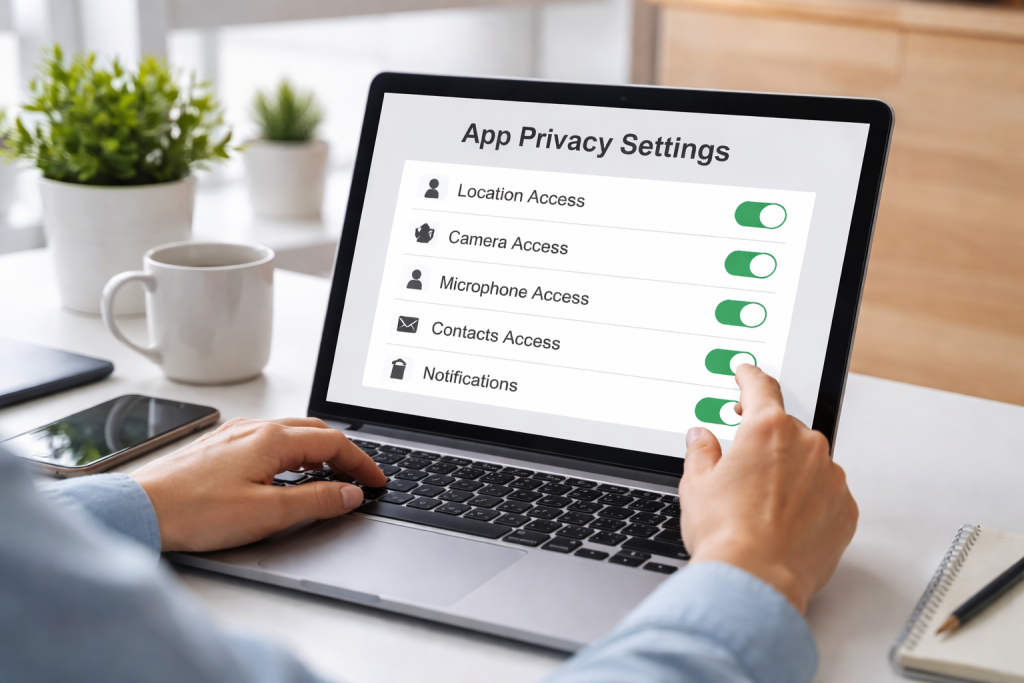
App permissions are the specific authorizations you grant to an application. These are the keys you hand over, allowing the app to access certain parts of your device and its data. Common permissions include access to:
Location Services
This allows an app to determine your geographical whereabouts. Apps may request constant access, access only while in use, or no access at all. Constant access can drain battery life and pose a significant privacy concern if not necessary for the app’s core function.
Contacts
Granting access to your contacts allows an app to read, add, or modify entries in your address book. Social networking or communication apps often request this.
Camera and Microphone
These permissions allow an app to use your device’s camera and microphone. While necessary for video calls or voice recording apps, unauthorized access can be a serious privacy violation.
Photos and Videos
This permission allows an app to access, view, and potentially modify the photos and videos stored on your device.
Storage
Permission to access your device’s storage allows an app to read and write files. This is often needed for apps that manage documents or media.
Calendar
Access to your calendar allows an app to read, create, and modify calendar events.
Call History and SMS Messages
These permissions grant an app access to your call logs and text messages. Applications that focus on communication or security typically request this.
Data Collection Practices
Beyond explicit permissions, apps also collect data through your interactions with them. This includes usage data, such as how often you use the app, what features you utilize, and how long you spend on each screen. They may also collect device information, such as your device model, operating system version, and unique device identifiers.
Types of Data Sharing
Understanding who an app shares your data with is also critical. This can include:
First-Party Sharing
This refers to the app developer using your data, often for internal analytics or to improve their services.
Third-Party Sharing
Here, your data is shared with external companies. This can be for advertising, analytics, or other business purposes. The specifics of this sharing are often outlined in the app’s privacy policy.
How to Customize Your App Privacy Settings
Taking control of your app privacy is an ongoing process, not a one-time setup. Regularly reviewing and adjusting your settings ensures they align with your current comfort level and the app’s evolving functionalities.
Device-Level Privacy Controls
Both Android and iOS operating systems offer robust settings to manage app permissions. These are your primary tools for controlling what each app can access.
On iOS Devices
Go to “Settings,” then “Privacy & Security.” Here, you will find a list of permissions (e.g., Location Services, Contacts, Microphones). Tapping on each permission will show you which apps have requested it and allow you to toggle their access on or off. You can also set location access to “Never,” “Ask Next Time,” or “While Using the App” for greater control.
For specific app settings, navigate to “Settings” and scroll down to find the list of individual apps. Tapping on an app will reveal its specific permission settings, allowing for granular adjustments.
On Android Devices
Go to “Settings,” then “Apps” (or “Applications”). Select the app you want to manage, and then tap on “Permissions.” Similar to iOS, you can review and toggle access for each permission category. Android also offers “App permissions” under “Security & privacy” for a system-wide overview.
You can also manage background activity and data usage for individual apps within their settings to further restrict their access and resource consumption.
In-App Privacy Settings
Many apps provide their own internal privacy settings. These often go beyond basic device permissions and offer more nuanced control over how your data is used within the app.
Social Media Platforms
Platforms like Facebook, Instagram, and X (formerly Twitter) have extensive privacy menus. Here, you can control who sees your posts, who can tag you, ad personalization settings, and data sharing preferences with third-party apps connected to your account.
E-commerce and Shopping Apps
opt out These apps often allow you to manage targeted advertising, opt out of personalized recommendations, and control the visibility of your purchase history.
Location-Based Services
Beyond device-level location settings, many apps that use location data offer options to disable location history, clear past location data, or control the precision of the location shared.
Reviewing Privacy Policies
While often lengthy and written in legal terms, privacy policies are the agreements between you and the app developer. They detail what data is collected, how it’s used, and who it’s shared with. Periodically reviewing these policies, or at least summaries of them, can provide valuable insight into an app’s data practices. Many online resources offer simplified explanations of app privacy policies.
Protecting Your Personal Information
The act of protecting your personal information online is like tending a garden. It requires vigilance, regular upkeep, and an understanding of the threats that can harm it.
The Principle of Least Privilege
When setting app permissions, adhere to the principle of least privilege. This means granting an app only the minimum access it needs to function. If a simple note-taking app doesn’t need access to your contacts or microphone, then do not grant it. This proactive approach significantly reduces the potential for data misuse.
Regularly Reviewing Permissions
Your needs and the functionalities of apps change over time. A new update might add features that require additional permissions. Similarly, you might stop using certain features of an app. Therefore, it is crucial to regularly audit your app permissions. Schedule a monthly or quarterly check-in to review the permissions granted to all your installed applications.
Deleting Unused Apps
Apps that are no longer in use are potential vulnerabilities. They may still have access to your data, even if you are not actively using them. Uninstalling unused apps is a simple yet effective way to minimize your digital footprint and reduce the risk of data exposure.
Considering App Permissions Before Installation
Before you even install an app, take a moment to review the permissions it requests. If a seemingly simple game asks for access to your contacts, call history, and microphone, it should raise a red flag. If the requested permissions seem excessive or unrelated to the app’s stated purpose, it is wise to reconsider installing it.
Managing App Permissions
The act of managing app permissions is an ongoing dialogue between you and your devices. It’s about setting clear boundaries for your digital interactions.
Understanding Permission Types and Their Impact
Some permissions are more sensitive than others. Location data, for example, can pinpoint your exact whereabouts, while access to your contacts can reveal your social network. Understanding the implications of each permission category is vital.
Examples of Sensitive Permissions:
- Location: Can reveal your daily routines, frequented places, and even your home address.
- Microphone/Camera: Can be used for covert surveillance.
- Contacts/Call Logs: Can reveal your social connections and communication habits.
- SMS/Call History: Can contain sensitive personal conversations and financial information.
Granular Control and Best Practices
Modern operating systems offer granular control over permissions. Instead of a simple on/off switch, you can often specify when an app can access certain data.
- Location: Choose “While Using the App” or “Ask Next Time” to limit prolonged tracking.
- Microphone/Camera: Grant access only when actively using a feature that requires it. Be mindful of apps that request constant access.
- Data and Background App Refresh: On iOS and similar settings on Android, control which apps can refresh their content in the background. This can save battery and data and limit background data collection.
Utilizing Privacy Dashboards
Both iOS and Android provide privacy dashboards or summary screens that offer an overview of app activity and permission usage. These dashboards can highlight apps that have recently accessed sensitive data, helping you identify potential areas of concern.
- iOS Privacy Report: Found in “Settings” > “Privacy & Security” > “App Privacy Report.” It provides insights into how apps are using your permissions and their network activity.
- microphone, and Android Privacy Dashboard: Accessible via “Settings” > “Privacy” > “Privacy Dashboard.” It shows which apps have used specific permissions (like location, microphone, and camera) and when.
Balancing Privacy and Functionality
The digital world often presents a trade-off between robust privacy and seamless functionality. It’s a delicate scale that requires careful adjustment based on individual priorities.
The Convenience Factor
Many apps offer enhanced convenience when granted extensive permissions. A music app that can access your contacts might suggest songs based on your friends’ tastes. A smart home app that accesses your location might adjust lighting and temperature as you approach home. The question becomes: how much convenience is worth compromising your privacy for?
Identifying Essential vs. Non-Essential Permissions
Consider the core purpose of an app. Does it truly need access to your camera to function as a calculator? Probably not. Distinguishing between permissions that are essential for an app’s primary function and those that are merely for added features or data monetization is key.
Making Informed Trade-offs
When faced with a permission request, ask yourself:
- “What benefit does this permission provide me?”
- “What are the potential risks associated with granting this access?”
- “Is there an alternative app that offers similar functionality with fewer permissions?”
Making an informed decision involves weighing the perceived benefits against the potential privacy implications. Sometimes, a minor inconvenience—like manually enabling location services when needed—is a reasonable price for enhanced privacy.
The Role of App Updates
App developers frequently update their applications. These updates can introduce new features, modify existing ones, or even change their data collection practices. It is important to be aware that after an update, you may be prompted to re-grant permissions, or new permissions might be added to the app’s requirements. Treat these prompts not as a nuisance but as an opportunity to re-evaluate if the new permissions align with your privacy expectations.
Staying Informed About App Privacy Updates
The digital privacy landscape is not static. New threats emerge, regulations evolve, and app developers continually refine their practices. Staying informed is your ongoing defense.
Following Tech News and Privacy Advocates
Reputable technology news outlets and cybersecurity experts often report on significant changes in app privacy, emerging privacy threats, and new data protection regulations. Following these sources can provide you with timely and relevant information. Privacy advocacy groups also play a crucial role in highlighting potential risks and pushing for stronger privacy protections.
Understanding Data Protection Regulations
Governments worldwide are implementing data protection regulations, such as the General Data Protection Regulation (GDPR) in Europe and the California Consumer Privacy Act (CCPA) in the United States. Understanding your rights under these laws, such as the right to access, modify, or delete your data, is an important aspect of digital self-defense. These regulations often impact how app developers can collect and use your information.
Being Wary of “Free” Services
Many services are offered for “free” because your data is the actual product. Subscription-based services or apps with transparent pricing models may offer a clearer value proposition regarding your privacy. It is important to recognize that in the digital economy, information is valuable, and if you are not paying for a service with money, you are likely paying for it with your data.
Developing a Digital Hygiene Routine
Just as personal hygiene involves regular practices for physical health, digital hygiene involves maintaining good habits for online well-being. This includes:
- Regularly clearing app data and cache.
- Using strong, unique passwords for each app and service.
- Enabling two-factor authentication where available.
- Being cautious about public Wi-Fi networks.
By actively engaging with your app privacy settings, understanding the data you share, and staying informed about the evolving digital landscape, you can navigate the connected world with greater confidence and security.
FAQs
What are app privacy settings?
App privacy settings are controls within an app that allow users to manage the collection, use, and sharing of their personal information. These settings typically include options for managing permissions, such as access to location, contacts, camera, and microphone, as well as controlling data sharing with third parties.
Why are app privacy settings important?
App privacy settings are important because they help users protect their personal information and maintain control over how it is used. By customizing privacy settings, users can minimize the risk of data breaches, identity theft, and unauthorized access to their personal data.
How can I customize my app privacy settings?
To customize app privacy settings, users can typically access the settings menu within the app and navigate to the privacy or security section. From there, they can review and adjust permissions for various types of data, such as location, contacts, photos, and more, based on their preferences.
What are app permissions, and how can I manage them?
App permissions are access rights granted by users to allow apps to access specific types of data or features on their devices. Users can manage app permissions by reviewing and adjusting the settings for each app, typically found in the device’s settings menu under “App Permissions” or “Privacy.”
How can I stay informed about app privacy updates?
To stay informed about app privacy updates, users can enable notifications for app updates on their devices and regularly check for updates in the app store. Additionally, they can follow the app developer’s official website or social media channels for announcements about privacy-related changes and new features.

Smart Tech Manual is a technology-focused platform dedicated to providing simple, clear, and beginner-friendly guides for everyday users.